Superheat on the dew point. Subcooling on the bubble point.
Glidechart is a PT chart and superheat/subcool calculator for HVAC/R service work, for R-410A, R-32, R-454B, R-22 and R-134a. Type what your gauges and clamp read, and the saturation temperature, the superheat and the subcooling appear as you type, with the working and its source under each one. No account, and it works with no signal.
- App StoreComing soon for iPhone and iPad
- Google PlayComing soon for Android
No account, no ads, and nothing collected. Privacy
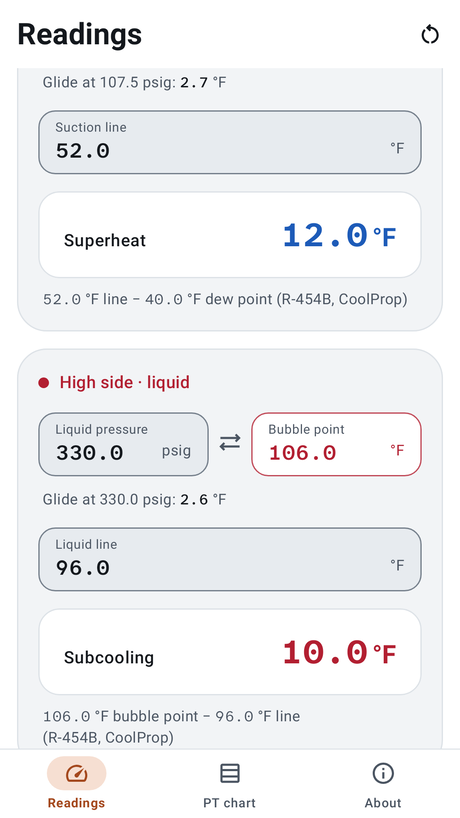
Laid out like your manifold
Low side · suction
Type the suction pressure and the dew point appears. Type the suction line temperature and the superheat appears: line temperature minus dew point.
High side · liquid
Type the liquid pressure and the bubble point appears. Type the liquid line temperature and the subcooling appears: bubble point minus line temperature.
The side decides the curve, so a blend is never read on the wrong one, and there is no dew or bubble switch to set. On R-410A and R-454B the two points differ by the glide, and Glidechart shows it at the pressure you typed. On R-32, R-22 and R-134a they are the same.
Check it yourself
-
Compare a number
R-410A at 40 °F reads 118.4 psig on the dew point and 118.8 psig on the bubble point. Put it beside the chart you trust.
-
See the glide
Pick R-454B and type 107.5 psig on the low side. The dew point is 40.0 °F, and the line under it reads “Glide at 107.5 psig: 2.7 °F”.
-
Turn the signal off
Put the phone in airplane mode and open Glidechart cold. Readings is the first screen, with no sign-in, and nothing you type leaves the phone.
Readings, the PT chart and a caution
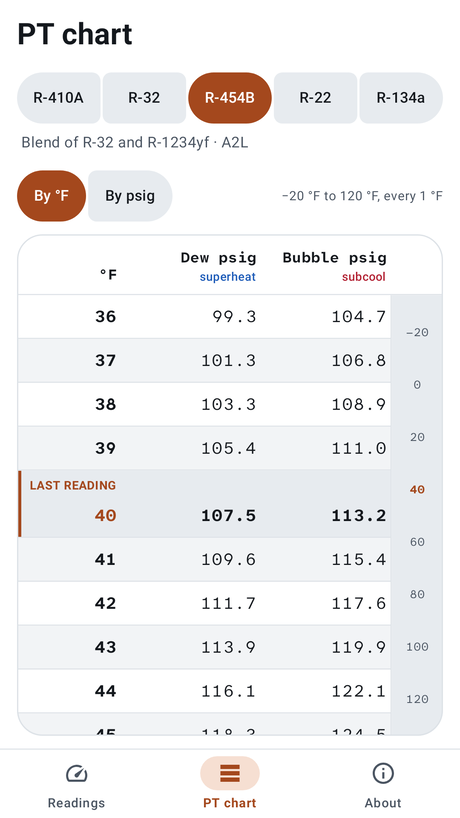
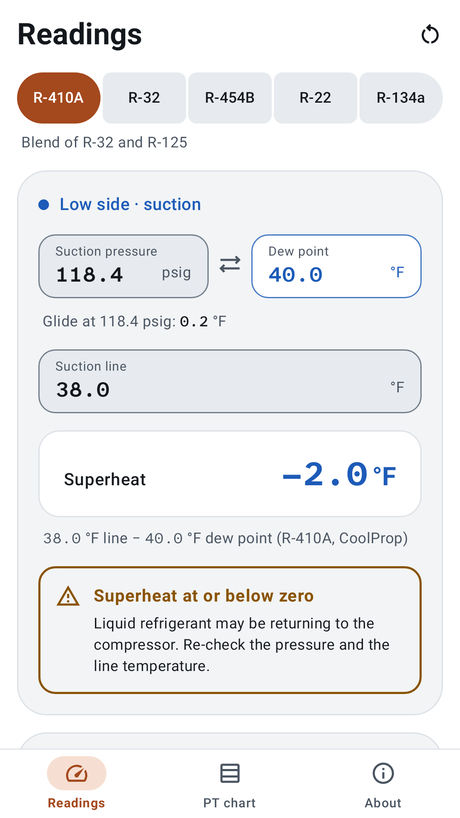
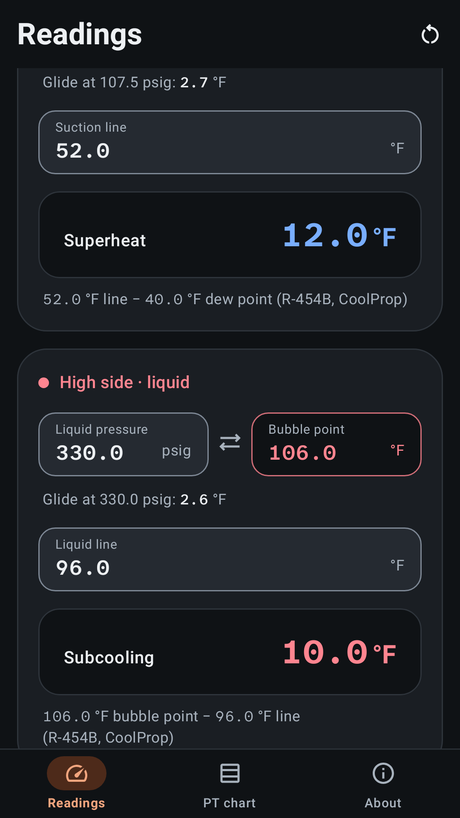
Screenshots from the built Android app, with real values from its table.
What it does
- Both sides at once. The low side gives the dew point and the superheat; the high side gives the bubble point and the subcooling. Each works both ways: type a saturation temperature to get its pressure.
- The working, written out. Under each result: “52.0 °F line − 40.0 °F dew point (R-454B, CoolProp)”.
- A PT chart every 1 °F from −20 °F to 120 °F, or every 1 psig across the same range, with the dew and bubble columns side by side on a blend. An index jumps straight to a row, and your last reading’s row is marked.
- Cautions, never verdicts. A superheat or subcooling at or below zero, a pressure with no saturation point, or a saturation temperature outside the chart’s range is flagged in amber with what to re-check. Glidechart gives readings. It does not judge a charge.
- Made for the service call. Opens straight to Readings. Clear empties both sides, and Undo puts them back. Long-press a result to copy it, source included. Dark mode, large text, VoiceOver and TalkBack.
- From the system. On iPhone, Spotlight finds each refrigerant and Siri answers “Look up PT in Glidechart”. On Android, long-press the icon for a refrigerant you used recently.
The source beside every number
Every value comes from CoolProp, the open-source thermophysical property library (the app carries a table CoolProp computed every 0.1 °F, and reads it on your phone): Bell, Wronski, Quoilin and Lemort (2014), Industrial & Engineering Chemistry Research 53(6), 2498–2508. CoolProp is used under the MIT License (notices).
R-454B is modelled as 68.9% R-32 and 31.1% R-1234yf by mass. R-32 and R-454B are A2L refrigerants, mildly flammable. Units are °F and psig, with gauge pressure measured from one standard atmosphere, 14.696 psia, so a negative psig is below atmospheric.
Reference only
Reference tool only — verify against manufacturer specs and site conditions before charging.
Privacy
Glidechart has no account and collects no data. What you type stays on your phone. Read the privacy policy.